Nexus vs Spreadsheets: the hiring sheet you started in, outgrown
Spreadsheets and email are how almost every team starts hiring, and for a role or two that's the right call. Nexus is where you move when volume shows up: a live two-sided candidate portal and a real pipeline, instead of columns that drift and a candidate who hears nothing.
A spreadsheet and an inbox are how almost every team starts hiring, and for your first role or two, that's the right call. It stops being the right call the minute two roles run at once and a dozen candidates are mid-process. Columns drift, interviews double-book, the "current" version is anyone's guess, and the candidate hears nothing. Nexus keeps the pipeline, the schedule, and the candidate's own view in one place, with a real portal a sheet can't give them. (Comparison as of September 2026.)
Four things that break when volume shows up
A sheet holds up fine for a handful of candidates. The trouble starts the minute two roles run at once and a dozen people are mid-process. Four failures show up first.
- An empty grid. A spreadsheet has no idea what a candidate is. You invent the columns, and they drift the moment someone adds their own. No stages, no interview record, no scorecard, just cells.
- Scheduling turns into a second job. Booking an interview is email tag across timezones, and a candidate ends up waiting on a reply that's sitting in someone's drafts.
- It breaks when a second person touches it. Five copies, none of them current, one overwrite away from losing a week. And when someone asks "why did we pass on her," there's no record to point at.
- The candidate hears nothing. The sheet has no outside. No portal, no status, just silence, and your best candidate reads that silence as "they're not interested" and takes the other offer.
Nexus vs Spreadsheets, feature by feature
| Feature | Nexus | Spreadsheets |
|---|---|---|
| Two-sided candidate portal (a persistent place for the candidate) | yes | None — the candidate has no account or view |
| Stage-gated candidate content | yes | None — no stages to gate content on |
| Top-of-funnel defense against auto-applied bots and agents | yes | Anyone or any bot who has the link lands in the sheet |
| Candidate self-scheduling | yes | Email back-and-forth |
| Structured stages and pipeline | yes | Columns you invent and maintain by hand |
| Interview scorecards and structured feedback | yes | A tab, or scattered chat messages |
| Single source of truth and audit trail | yes | Whichever copy happens to be open |
| Automated candidate and team notifications | yes | You send each one by hand |
| Import from and export to a spreadsheet | yes | It is the spreadsheet |
What Nexus brings to the table
Every candidate gets a home, not a status email
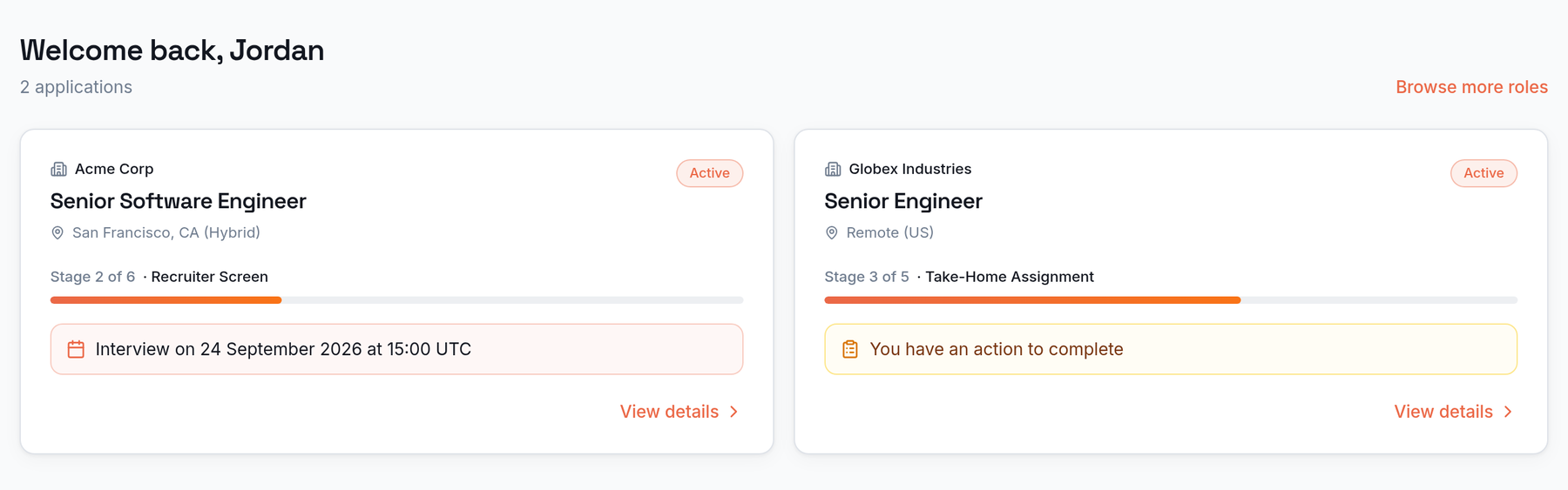
Most ATSes give the candidate status emails and a careers-page link. Nexus gives every applicant a live, persistent portal: each application's current stage, the next action, interview details, and documents in one place they can return to any time, not an inbox they have to search.
A gate built for the AI-application era
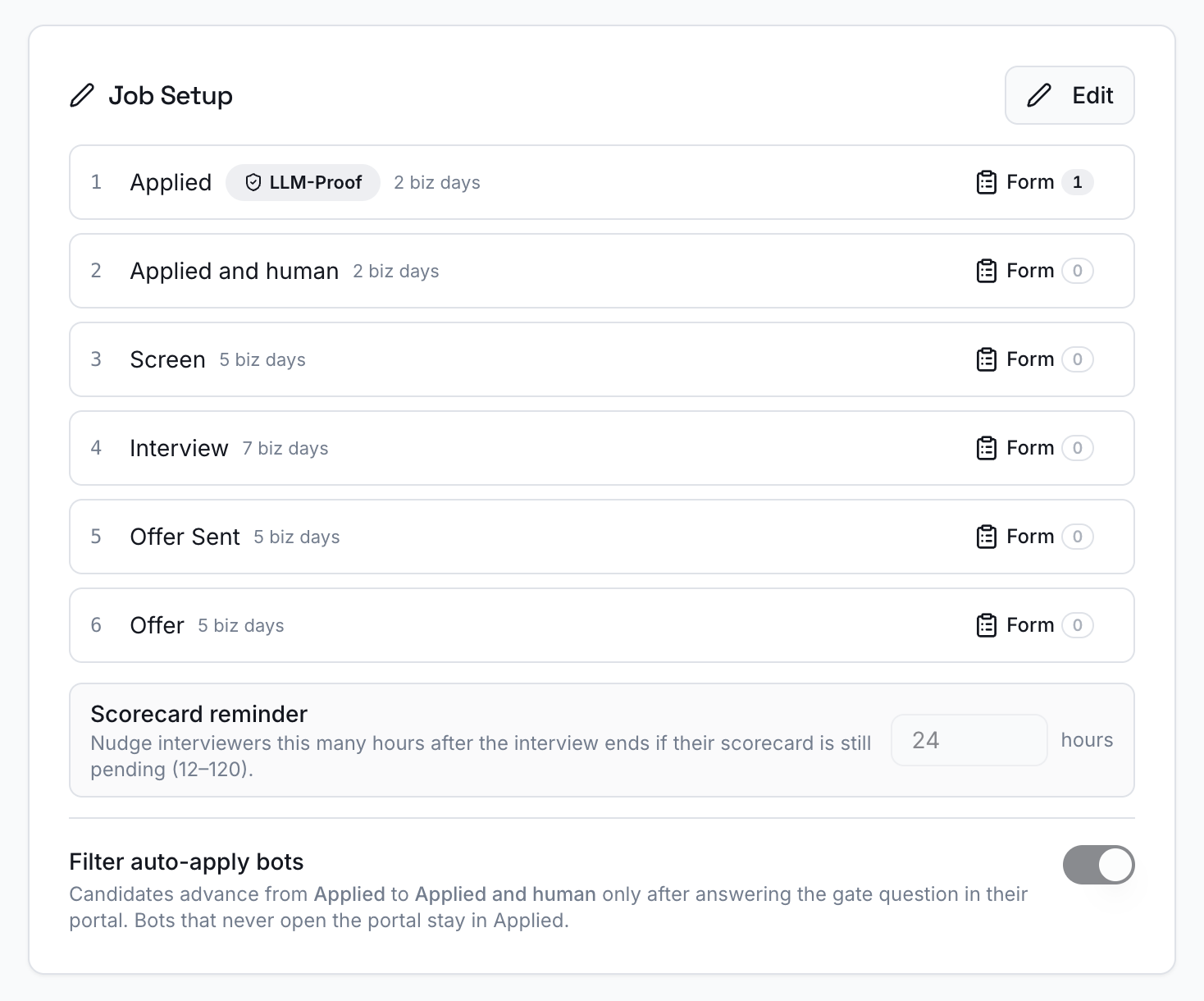
A per-job human-filter gate keeps auto-applied bot and agent submissions out of the real pipeline. Applications land in "Applied" and only advance to "Applied and human" once a real person opens their portal and answers one question, so reviewers spend their time on submissions that cleared the gate.
One application, fully alive
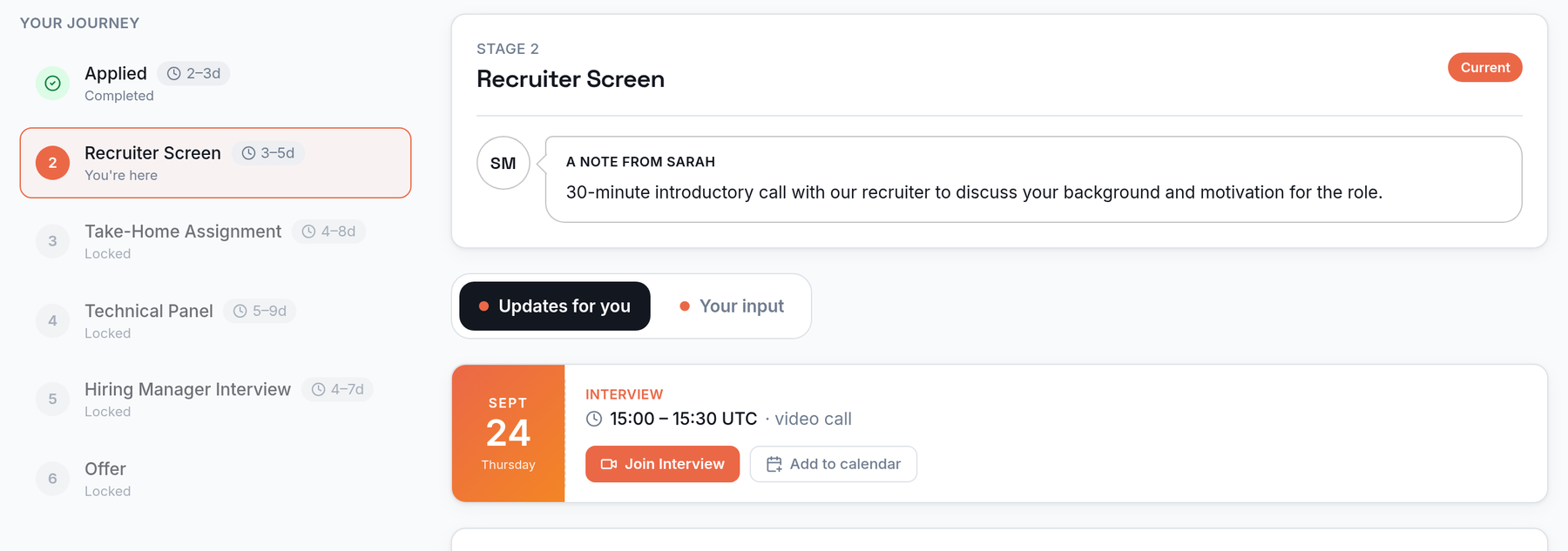
Inside a single application, the candidate sees exactly which stage they're in and what's next, a note from the recruiter, and per-stage documents as they become relevant. Scheduled interviews carry a join link and add-to-calendar, and an "Updates for you" / "Your input" split keeps what they need to read apart from what they need to do.
When a spreadsheet is still enough
- You're hiring for one role at a time, with a handful of candidates you can hold in your head.
- One person owns the whole process and nobody else needs to see or edit the file.
- Candidates don't need much more than an email when something changes.
When it's time to move to Nexus
- Two or more roles are open at once and candidates are stacking up mid-process.
- More than one person needs the same, current view without emailing copies around.
- Scheduling and status updates are eating real time, and good candidates are going quiet.
- You want every candidate to have a live portal of their own, not a status email they have to chase.
Frequently asked questions
When does a team actually outgrow spreadsheets for hiring?
Usually the minute a second role opens or a third person needs to see the pipeline. A single sheet works for one coordinator and one role, but it breaks down once several candidates are mid-process, interviews need scheduling, and more than one person edits the file. That's the point where drift, double-bookings, and dropped candidates start costing you hires.
Can we import our existing candidate spreadsheet into Nexus?
Yes. Nexus imports candidates from a spreadsheet in bulk, so you can move an in-flight process over without re-keying it by hand. You bring the rows you already have and place them straight into the right stage of the pipeline.
Can we still export to a spreadsheet when we need to?
Yes. Nexus doesn't lock your data in. You can still pull candidate and pipeline data out to a spreadsheet whenever a stakeholder wants a plain grid, so moving to Nexus isn't a one-way door.
Is Nexus overkill if we're only hiring for one or two roles?
If you're hiring for a single role with a few candidates and one person running it, a spreadsheet can genuinely be enough. Nexus earns its place the moment volume shows up: multiple roles, several people involved, candidates who need to be kept informed. It's built to be light enough to start with before you feel that pain, not a heavy enterprise suite to configure.
What do candidates see with Nexus that a spreadsheet can't give them?
Their own live portal. With a spreadsheet, the candidate sees nothing — they wait on emails that may never come. In Nexus, every candidate gets a persistent portal showing their current stage, what's next, interview details with a join link, and a place to ask questions, joined to the hiring team at the handoff. A spreadsheet has no outside; Nexus is two-sided by design.